Topview AI Review – Introduction
In today’s fiercely competitive digital marketing landscape, Topview AI emerges as a revolutionary tool promising to eliminate the traditional headaches of video production. Designed for creators, marketers, and entrepreneurs alike, Topview AI delivers automated video creation at lightning speed—complete with avatars, realistic voiceovers, and scene-by-scene customization. In this in-depth review, we’ll explore the platform’s most powerful features, who should use it, and whether it’s worth the price.
Topview AI Review – Overview
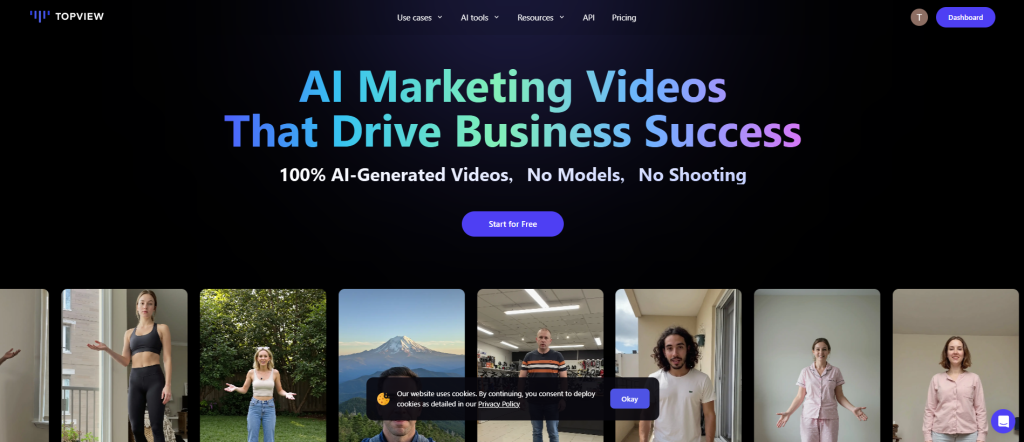
Topview AI is a browser-based, AI-powered video production tool that helps users create professional-grade videos using nothing more than a product link, images, or written prompts. With robust avatar integration, multilingual voiceovers, smart script generation, and real-time customization, Topview AI allows you to go from concept to completion in under five minutes.
No editing experience? No problem. Topview AI handles the heavy lifting—analyzing links, selecting images, scripting dialogue, assigning avatars, and rendering videos automatically.
Whether you’re showcasing an Amazon product, a TikTok trend, or a Shopify gadget, Topview AI makes the process almost effortless.
What Is Topview AI?
Topview AI is an all-in-one video creation platform driven by artificial intelligence. It specializes in:
- Avatar-based marketing videos
- Auto-scripting from product links
- Multilingual voiceover and subtitle generation
- Drag-and-drop editing capabilities
- Realistic lip-synced avatars
You start with a simple product link from a supported platform—Amazon, Shopify, eBay, or TikTok. Topview AI then pulls the images, description, and existing videos from the product page and generates a complete marketing video.
From personal branding videos to review content to eCommerce promos, it’s one of the most flexible AI marketing tools available.
Topview AI Review – Features and Benefits
1. One-Click Product Video Creation
Topview AI transforms product URLs into animated video content with just one click. It analyzes the page’s content—titles, images, videos, and descriptions—and creates a script automatically. You simply confirm or edit what it generates.
2. AI-Generated Avatars
One of Topview AI’s standout features is its vast collection of avatars—AI-generated digital humans who can speak, gesture, and represent your brand. These avatars come with various ethnicities, age groups, and dress codes, allowing you to choose one that matches your product’s audience.
3. Realistic AI Voiceovers
You can choose from a broad library of AI voices categorized by language, tone, accent, gender, and even emotional tone. The voices sound natural and fluent, and they synchronize perfectly with the selected avatar’s lips.
4. Multilingual Support
Topview AI supports over 20 languages. This is a massive benefit for global marketers and YouTubers who want to target international audiences. It supports not just the voiceover but also adds automatically translated subtitles.
5. Advanced Scene Editing
Even though the video is auto-generated, you’re not locked in. You can enter the scene editor and adjust each visual element. Replace videos, swap images, add GIFs, insert logos, and fine-tune subtitles. The scene editor supports drag-and-drop simplicity with timeline-based editing.
6. Template and Batch Options
Topview AI allows batch creation of videos from multiple product links. You can also use ready-made templates for YouTube reviews, Instagram reels, TikTok shorts, and Facebook ads.
7. Custom Branding and Watermark
You can add your brand’s watermark, logo, or outro scene. This helps creators build a consistent identity across platforms.
8. Credits-Based System
The system works on credits, where each video export costs a set number of credits. Free users get 10 credits monthly, enough to experiment, while premium plans offer hundreds of credits and faster rendering.

How Does It Work?
The user journey is intuitive:
- Sign Up – Use Google, Apple, or email.
- Select Avatar Marketing Video – This feature lets you paste a product link.
- Link Analysis – The software auto-pulls media from the page.
- Media Selection – Choose which images or videos to include.
- Custom Edits – Modify the product name, description, or upload your own content.
- Script & Style – Pick your script style, target audience, and video length.
- Choose Avatar & Voice – Select the digital spokesperson and appropriate voice.
- Generate Video – AI produces multiple script versions and renders the first one.
- Edit Scenes (Optional) – Make refinements: swap visuals, change avatar, or adjust subtitles.
- Export – Download your video with or without watermark depending on your plan.
The entire process—from link to finished video—typically takes under 5 minutes.
Topview AI Review – My Experience Using It
After testing Topview AI on several product links, the experience was incredibly fluid. Here’s a breakdown of the actual performance:
Speed & Simplicity
The software analyzed the Amazon link I provided in under 15 seconds. Script generation took about 10 more seconds, and the full video was ready for preview within 3 minutes.
Avatar Realism
The avatars looked sharp and their lip-sync was accurate. They didn’t look robotic or awkward. This realism added a huge level of trust to the videos.
Voiceover Quality
Voice selection was diverse and high-quality. I tried British, American, and Australian accents—all sounded natural and professional.
Scene Editor
I was able to replace scenes, add a brand logo, and even change subtitle colors. This was surprisingly robust for a browser-based tool.
Exporting
Exporting the video with a watermark was seamless. If you want the watermark removed, you’ll need to subscribe—but the pricing is reasonable.
Topview AI Review – REVIEW – OTO DETAILS
While Topview AI doesn’t follow the classic “OTO” (One-Time Offer) upsell model often seen in internet marketing launches, it does offer a scalable pricing structure with optional upgrades:
- Upgrading to premium plans removes watermarks, unlocks premium avatars, increases storage, and offers batch processing tools.
- Voice cloning and team collaboration tools are available in higher plans.
- Enterprise-level customization is available for agencies and large companies.
Pros and Cons
Pros
- Fast video generation with minimal input
- Professional avatars and realistic voices
- Custom editing available per scene
- Multilingual support with auto-subtitles
- Export-ready in minutes
- Competitive pricing
- Cloud-based (no download needed)
Cons
- Some avatars require premium access
- Free version has watermark
- Occasional delays during peak hours
- Mobile editing not fully optimized
- Voice cloning is limited to higher tiers
Who Should Use It?
Topview AI is ideal for:
- eCommerce sellers looking to showcase their products on Amazon, eBay, or Shopify
- Affiliate marketers who need quick review videos
- YouTubers and TikTok creators who want to increase content production
- Agencies seeking scalable video creation for multiple clients
- Teachers and presenters looking to create educational material using avatars
- Multilingual brands targeting international audiences
Topview AI Review – Price and Evaluation

The pricing structure is credit-based:
Free Plan
- 10 credits per month
- 100+ avatars and voices
- 1 custom avatar
- Watermark included
- Max 30-second video
Starter Plan – $19/month
- 50 credits
- 500+ avatars
- No watermark
- Priority rendering
- Upload your logo
- 50 GB storage
Business Plan – $75/month
- 250 credits
- Voice cloning
- Up to 12 scripts per project
- Enhanced scene editor
- 300 GB cloud storage
Enterprise Plan
- Custom pricing
- API access
- Unlimited avatars
- Multiple user accounts
- Priority support
Evaluation:
The value here is exceptional. For $19/month, you get access to professional-grade avatars, voices, branding options, and fast exports—no watermark, no complexity. For agencies, the Business Plan is a must-have.
Conclusion
Topview AI stands out in a sea of AI tools by delivering what most overpromise—real, usable marketing videos that are ready in minutes. With its intuitive interface, fast rendering, multilingual support, and avatar personalization, Topview AI is a game-changer for content creators, affiliates, and brands.
If you’re tired of editing manually, want to multiply your video content output, and need global language support, Topview AI is absolutely worth it.
This isn’t just a tool—it’s a productivity powerhouse.