Submagic Review – Introduction
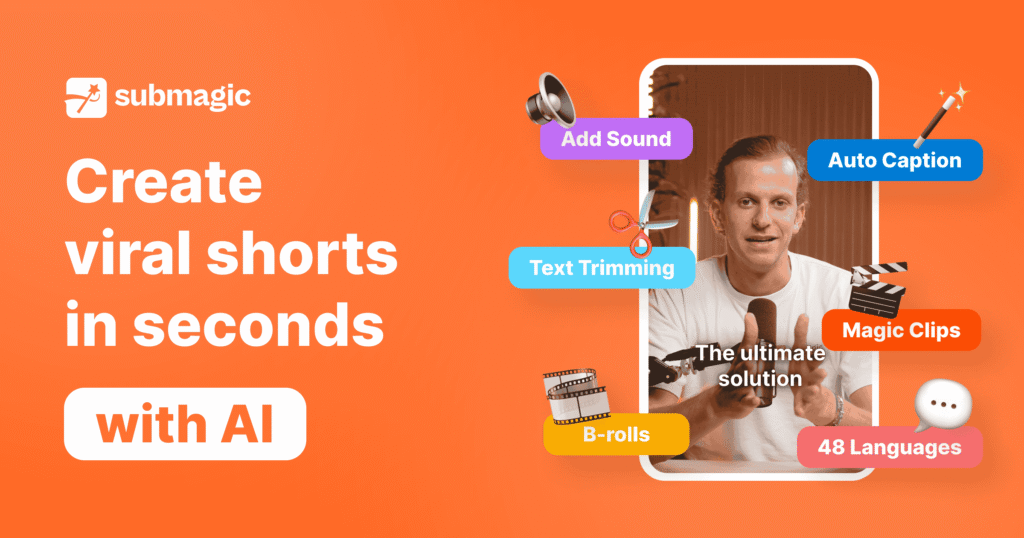
In today’s fast-paced content landscape, creators and marketers need tools that help them stay ahead. Submagic has emerged as one of the most powerful AI-driven video editing platforms built specifically for short-form content like TikToks, YouTube Shorts, and Reels. With AI-powered features like auto-subtitling, B-Roll generation, smart trimming, and collaboration tools, Submagic promises to revolutionize the way creators produce and publish viral-ready videos.
In this Submagic Review, we’ll walk through its features, usability, pricing, and performance in detail. Whether you’re a solo content creator, a social media manager, or part of an agency, this in-depth review will help you decide if Submagic is the right fit for your video editing needs.
Submagic Review – Overview
Submagic is a browser-based AI video editing software that focuses primarily on automating repetitive tasks like subtitle generation, trimming silences, removing filler words, adding music, B-Roll clips, and optimizing content for short-form platforms.
With a user-friendly interface and built-in intelligence, Submagic allows creators to save hours of manual editing by leveraging automation. The software is particularly well-suited for creators who post frequently and need to maintain a consistent publishing schedule with high-quality visual storytelling.
Submagic supports various export qualities, multiple speaker subtitles, and brand customization, making it more than just a basic captioning tool—it’s a full-fledged short-form editing solution.
What Is Submagic?
Submagic is an AI-powered video editing tool designed for the specific demands of short-form content creation. Unlike traditional editors, it doesn’t rely on complex timelines or multi-track layering. Instead, Submagic brings automation to the forefront by allowing users to:
- Automatically generate subtitles in multiple languages
- Auto-trim pauses, stutters, and filler words
- Add engaging B-Roll and zoom effects that match dialogue
- Insert custom hooks and thumbnails
- Clean up audio and apply background music
- Export in HD, 2K, or 4K resolution (depending on plan)
Submagic combines speed and quality, allowing creators to go from raw footage to ready-to-publish clips in just minutes.
Submagic Review – Features and Benefits
1. Auto-Caption Generation
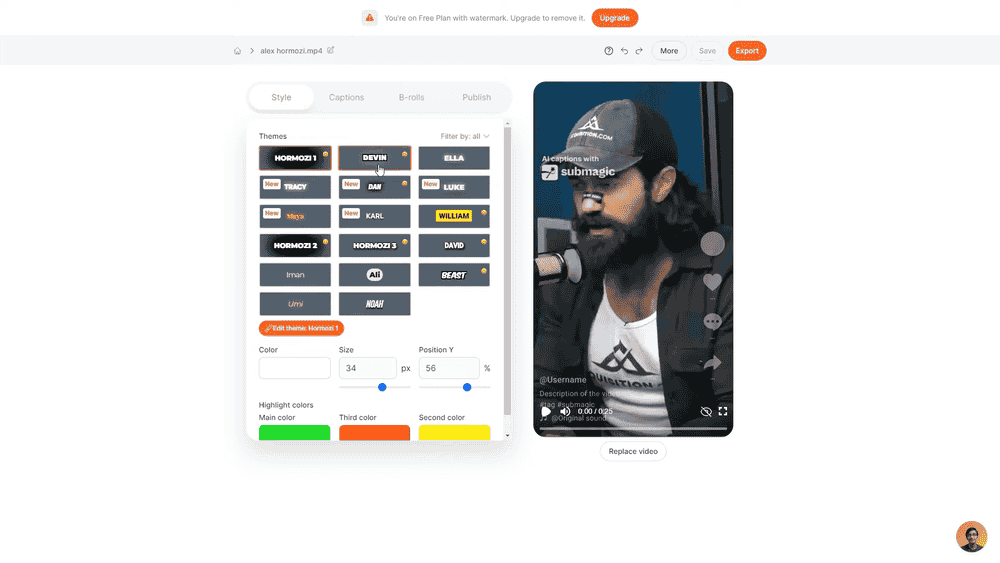
Submagic uses advanced speech recognition AI to auto-generate subtitles with high accuracy. You can select your spoken language, and the tool transcribes the dialogue into readable, synchronized captions. Each subtitle is editable, allowing for precise control over timing, font, size, color, and speaker labels.
2. Multi-Speaker Detection
One standout feature is its multi-speaker support. Submagic assigns different subtitle colors for each speaker, making it perfect for interviews, podcasts, or dual-speaker content. This improves readability and helps your audience easily follow who’s speaking.
3. Subtitle Translation
Submagic supports subtitle translation into multiple languages—ideal for global audiences. This feature is available in premium plans, and helps repurpose content for international viewers in just a few clicks.
4. Trim Editor
The Trim feature lets you remove filler words, awkward pauses, or sections of dialogue. This text-based editing model simplifies the process by allowing you to highlight words and remove them directly from the transcript—without touching a timeline.
5. AI B-Roll Integration
Submagic includes an intelligent Magic B-Roll generator that scans your dialogue and automatically inserts relevant royalty-free visuals or GIFs to enhance viewer engagement. You can manually search for B-Roll content too, offering flexibility for creators who want full control.
6. Magic Zoom & Motion Effects
To enhance visual engagement, Submagic adds AI-powered zoom effects that keep videos dynamic and attention-grabbing. Choose between fast, linear, or smooth zoom options for different visual effects.
7. Sound Effects & Background Music
Add automatic sound effects tied to keywords or tone, and layer in background music with volume control. You can use included tracks or upload your own. The platform also cleans up background noise to improve vocal clarity.
8. Hook Generator
Start your video with a “hook title” overlay—an attention-grabbing message that appears in the first few seconds. Choose from pre-designed templates, customize fonts, size, placement, and duration. This feature is crucial for stopping scrolls on platforms like TikTok or Instagram.
9. Thumbnail & Branding Options
Pick a custom thumbnail frame or upload an image. Add logos or text branding directly into the video. Submagic helps build visual consistency for creators or agencies managing multiple accounts.
10. Eye Contact Correction
This pro-only feature adjusts your eye line to simulate direct viewer eye contact—perfect for webcam recordings where you’re not looking directly at the lens.
How Does It Work?
Using Submagic is incredibly simple:
- Create an account with email or Google.
- Upload your video, select the spoken language.
- Turn on multi-speaker and subtitle translation if needed.
- Click Generate Captions—let the AI work.
- Use Trim to remove filler words, silence, or bad takes.
- Apply styles, fonts, and colors to your subtitles.
- Add B-Roll, zoom, and sound effects.
- Create a hook title and insert a thumbnail.
- Finalize audio edits and export settings.
- Click Export and download your final video.
Submagic Review – My Experience Using It
After using Submagic on several videos, the experience is smooth and intuitive. What stood out the most:
- Subtitles are generated almost instantly, and were 98% accurate on native-English speech.
- Text-based editing is a game-changer. No need to scrub through timelines—just delete parts of the transcript.
- The Magic B-Roll engine felt like having a virtual editor. It picked clips that matched my spoken words contextually.
- The hook overlay feature significantly boosted engagement—especially useful for shorts and Reels.
- Export time was fast, and I appreciated the option to go up to 4K on Pro plans.
The only downside was the watermark on free exports, and some advanced features being locked unless you upgrade.
Submagic Review – REVIEW – OTO DETAILS
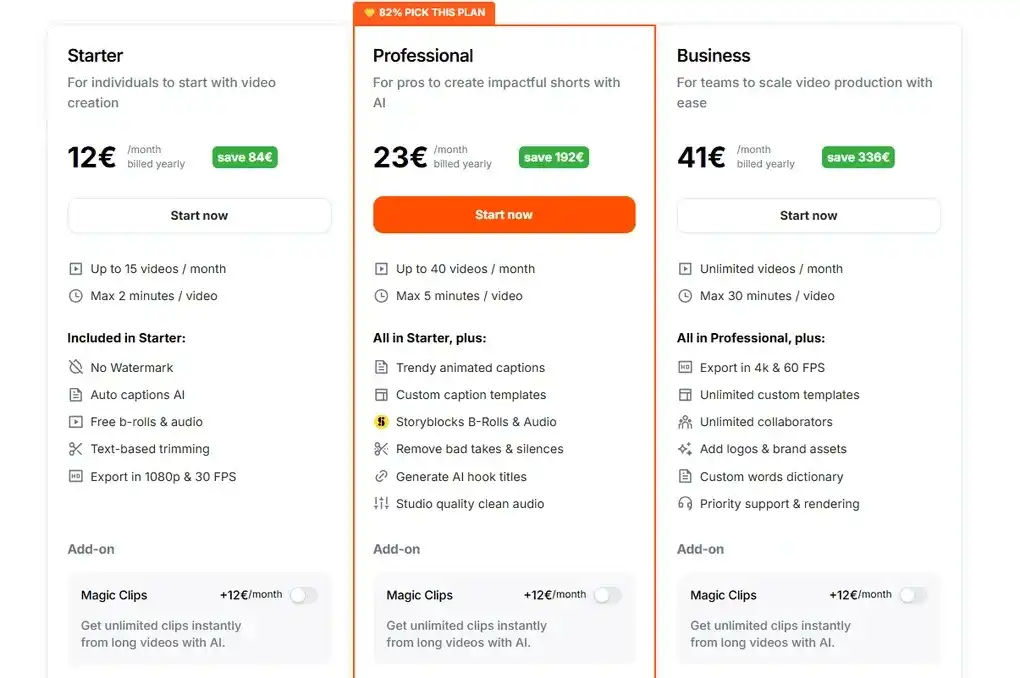
Submagic offers four plans, each catering to a different type of user:
Free Plan
- 3 video uploads/month
- Full HD export with watermark
- Basic AI captions and trimming
Starter Plan (€12/month)
- 15 short videos/month (up to 2 minutes)
- Watermark-free export
- Magic Zoom, music, and hook features
- Basic collaboration tools
Professional Plan (€23/month)
- 40 videos/month (up to 5 minutes)
- Access to all AI tools: B-Roll, Zoom, filler-word removal
- Team collaboration for 3 users
- 2K export
Business Plan (€41/month)
- Unlimited uploads (up to 30 minutes/video)
- 4K export support
- Unlimited collaborators
- Priority support, branding kits, templates
Each plan includes options for additional minutes, translation, and branding upgrades.
Pros and Cons
✅ Pros
- Highly accurate subtitles and AI trimming
- Streamlined workflow—no editing software required
- Smart B-Roll and zoom effects make videos more engaging
- Excellent value for solo creators and small agencies
- Ideal for short-form platforms: TikTok, Shorts, Reels
❌ Cons
- Free plan includes watermark
- Limited upload length without upgrade
- No desktop version; browser only
- Heavier editing (multi-cam/timeline) not supported
Who Should Use It?
Submagic is ideal for:
- Influencers and TikTok creators
- Social media managers and digital agencies
- YouTubers who repurpose long-form content
- Coaches and educators sharing lessons on Instagram or Reels
- Podcasters turning conversations into clips
It’s not designed for cinematic filmmakers or advanced VFX editors, but for short-form video creators, it’s one of the most efficient tools available.
Submagic Review – Price and Evaluation
Submagic offers exceptional pricing compared to tools like Descript, Pictory, or Veed. With most features starting at just €12/month, it’s a smart investment for creators serious about content output and quality.
For most users, the Professional Plan offers the best balance of value and performance—enabling full AI power without overwhelming cost.
Conclusion
To wrap up this Submagic Review, it’s clear that Submagic is more than just a subtitle tool—it’s a comprehensive AI video editing platform that automates hours of manual work. From auto-captioning and intelligent B-Roll generation to brand overlays and sound editing, Submagic equips creators with everything they need to produce engaging, scroll-stopping short-form content.
If you’re a digital content creator looking to boost your editing speed and quality, Submagic is one of the best AI tools to consider today.