
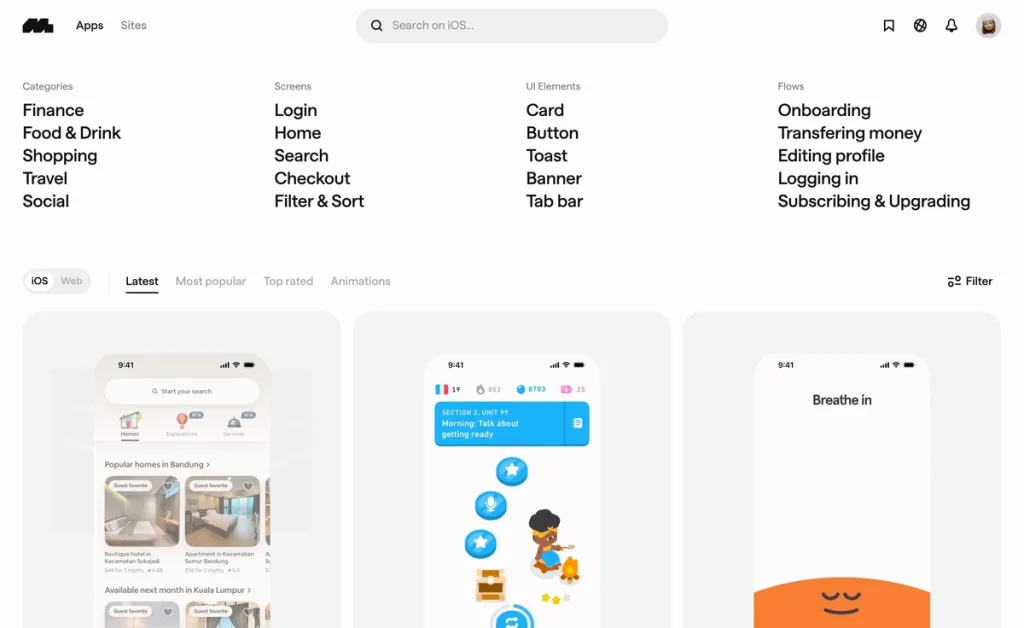
Struggling to find high-quality UI design inspiration for your mobile or web apps? This Mobbin Review explores how this platform can unlock your creative potential by providing an extensive library of beautifully crafted screens and systems. Whether you’re a seasoned designer or just starting out, Mobbin simplifies the discovery process to save you time and spark fresh ideas.
In this comprehensive Mobbin Review, we’ll dive into its key features, pricing options, and how it benefits users looking for reliable UX and UI design inspiration. Plus, you’ll find a step-by-step guide on how to make the most of Mobbin’s extensive design screen library and digital product design tools to enhance your workflow effortlessly.
Mobbin is a comprehensive design screen library tailored for mobile and web apps, offering a rich collection of real-world UI and UX examples. It provides designers with easy access to thousands of carefully curated screens, helping streamline the inspiration phase and enhance the overall design process. Whether you’re seeking mobile app design inspiration or looking to refine web app interfaces, Mobbin caters to a wide range of needs. Its diverse catalog includes UI patterns, interaction flows, and full-screen designs that reflect current trends and proven user-friendly layouts. Recognized and trusted by top design teams globally, Mobbin has earned a reputation for reliability and quality. Its extensive, up-to-date library makes it an ideal resource for those aiming to elevate their design workflow with practical, tested examples. To explore more ways to boost your creativity, you might want to check out UI design inspiration tools for creative professionals.
Mobbin truly stands out for UI and UX designers thanks to its extensive searchable library boasting over 600,000 screens. This vast collection of real-world design examples spans mobile and web applications, offering invaluable inspiration for every project. Whether you’re hunting for mobile app design inspiration or web app design inspiration, Mobbin’s library ensures you have a comprehensive resource at your fingertips. Additionally, Mobbin features powerful filtering and search options that let you pinpoint exact design elements with ease. You can filter by categories such as platform, color, pattern, or style, helping you narrow down design screen library options quickly and efficiently. This precision makes it easier to find relevant, high-quality references tailored to your current design challenges. Beyond just inspiration, Mobbin integrates design system inspiration and workflow tools directly within the platform. These digital product design tools help streamline your entire creative process by linking aesthetic ideas with practical UI components and workflow planning. For example, designers can explore design tokens and component patterns that align with modern design systems, saving time and boosting consistency across projects. If you want to experience these features firsthand, consider signing up for a free Mobbin account to explore their collection. This will give you immediate access to the extensive library and intuitive tools, allowing you to elevate your design work with high-quality UI design inspiration from a trusted source.
Mobbin offers a generous free account option that allows users to dive into its extensive design screen library without the hassle of providing credit card details. This means you can start exploring UI and mobile app design inspiration right away, making it perfect for those just beginning their creative journey or needing quick references without commitment. For users seeking more advanced features, Mobbin provides paid subscription plans that unlock additional benefits such as unlimited access to new design screens, enhanced filtering options, and priority updates to their design system inspiration. These plans are tailored for professional designers and product teams who rely on a steady stream of fresh ideas and organized workflows. Considering its robust offering compared to other digital product design tools, Mobbin’s pricing delivers excellent value. The subscription plan especially shines for designers needing reliable, organized UI and UX design inspiration to fuel their creative workflows without interruption. If you’re ready to make the most out of Mobbin’s features and streamline your design process, it is worth looking for any exclusive deals before upgrading your account.
Mobbin stands out for its vast design screen library, offering thousands of real-world examples from top mobile and web apps. This extensive collection makes it effortless to find UI design inspiration that aligns with current trends and best practices. Additionally, Mobbin’s user-friendly interface ensures that both seasoned designers and newcomers can navigate the platform smoothly. Its reliable search functionality allows users to quickly filter screens by categories, components, or app names, streamlining the research process. On the flip side, beginners might encounter a slight learning curve when first exploring Mobbin’s full range of features. While the tool is powerful, understanding how to maximize its capabilities for specific design workflows may take some time. However, this challenge also invites users to deepen their design knowledge through exploration. To truly appreciate how Mobbin fits into your creative process, it’s worth trying their free trial. This way, you can evaluate usability firsthand and decide if it supports your design needs effectively before committing. Feel free to check it out and explore their collection—you might find just the inspiration you need for your next project.
Getting started with Mobbin is straightforward and rewarding. First, create a free Mobbin account using your email or Google sign-in—no credit card needed. Setting up your account quickly unlocks access to thousands of high-quality UI design inspiration screens, perfectly suited for mobile and web app creators. Once logged in, the interface feels intuitive and clean. You can easily navigate through hundreds of thousands of design examples by applying precise filters—such as platform type, UI patterns, or industry categories—to find inspiration tailored to your project. For instance, searching for “mobile app design inspiration” highlights modern, on-trend screens that help jumpstart your creativity. To make the most of Mobbin, tap into its powerful features like saving favorite screens, creating collections, and comparing design styles side-by-side. These tools streamline your design workflow by organizing ideas and enabling quick references during development. Whether you’re refining your design system inspiration or gathering components for a new digital product, Mobbin enhances productivity seamlessly. For those who want to dive deeper, you may also want to explore our step-by-step guides for digital product design tools to complement your use of Mobbin. Overall, Mobbin is an invaluable design screen library that transforms how you discover and apply UX and UI inspiration.
Mobbin is ideally suited for UI/UX designers who need a comprehensive source of mobile and web app design inspiration. Whether you’re crafting interfaces from scratch or refreshing existing designs, Mobbin’s extensive design screen library allows you to explore current trends and best practices to spark creativity and improve your work. Design teams also benefit greatly from Mobbin as it serves as a centralized hub for design system inspiration. Collaborators can align on consistent styles, components, and user flows by accessing well-organized examples, accelerating team workflows and reducing guesswork when establishing or refining design standards. Product managers and developers find Mobbin valuable for staying informed about evolving design trends. Understanding modern UX/UI conventions through real-world examples helps cross-functional teams build digital products that resonate better with users, ensuring more effective and user-friendly app experiences. Signing up for a free Mobbin account is simple—just visit the official website, enter your details, and start exploring thousands of screens immediately. The free plan offers access to a robust selection of features, making it easy to integrate Mobbin into your daily design workflow and elevate your projects.
What Is Mobbin and How Does It Inspire Your Design Process?
Key Features That Make Mobbin Stand Out for UI & UX Designers
Understanding Mobbin Pricing and Subscription Plans
Feature
Free Account
Paid Subscription
Access to design screens
Limited
Unlimited
Advanced filtering and search
Basic
Enhanced
New screen updates
Limited
Priority access
Pros and Cons of Using Mobbin for Design Inspiration
How to Use Mobbin Effectively: Step-by-Step Guide for Designers
Who Should Use Mobbin? Ideal Users and Use Cases