Magic Light AI Review – Introduction
Welcome to our Magic Light AI Review, a deep dive into one of the most exciting AI-powered storytelling tools available today. If you’re a content creator, marketer, teacher, or hobbyist looking to transform ideas into compelling animated videos, Magic Light AI promises to make that process fast, intuitive, and affordable. In this review, we explore everything from setup and features to pricing, pros and cons, and our own experience using the platform.
Magic Light AI Review – Overview
Magic Light AI is a cloud-based platform that allows users to create storytelling videos from scripts or basic prompts. Unlike generic video editors, this tool focuses purely on story-driven content creation, complete with character consistency, scene control, and animated sequences. Whether you’re creating a fairytale, an explainer, or a fictional drama, Magic Light AI helps you produce animated videos with minimal effort and maximum creativity.
What Is Magic Light AI?
Magic Light AI is an AI-powered video creation software that allows users to create characters, write scripts, and transform those scripts into dynamic animated scenes. The platform is centered on storytelling, with built-in tools for generating characters, assigning them to scripts, and auto-generating scenes complete with narration, subtitles, music, and even character animation.
It’s particularly effective for:
- Storytelling channels on YouTube
- Educational video content
- Marketing videos with fictional narratives
- Children’s content creators
- Creative authors visualizing stories
Magic Light AI Review – Features and Benefits
1. Easy Account Creation
Users can quickly register via Google, Discord, or email. The onboarding is seamless and beginner-friendly, requiring no prior animation experience.
2. Character Creation Engine
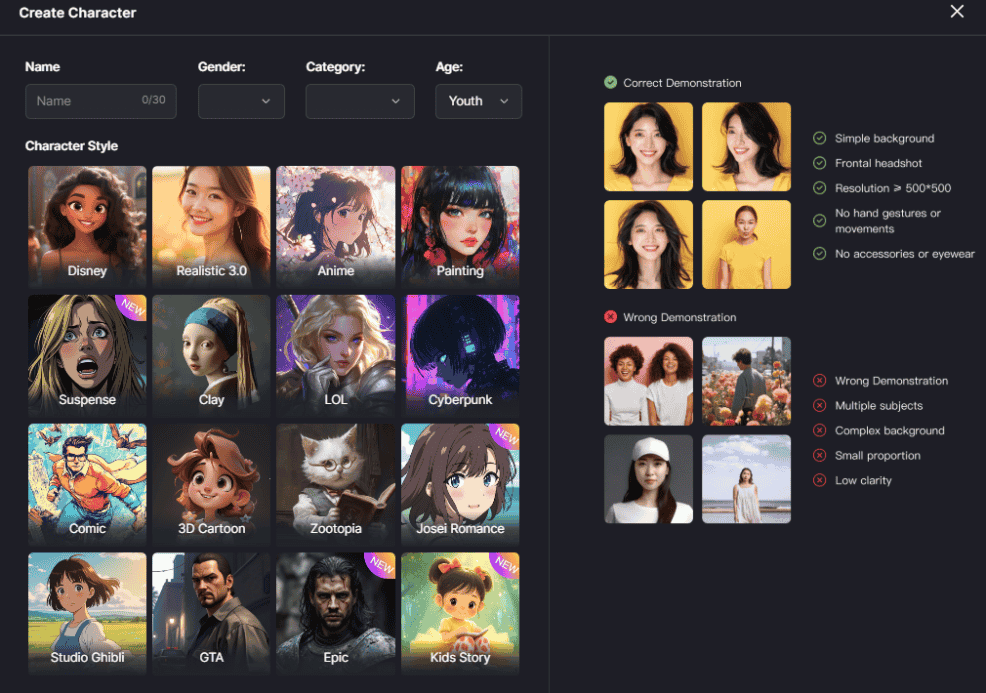
You can create characters by entering a basic prompt such as “a little boy” or “a dragon,” then use the AI Expand function to generate a detailed character description. Each character creation consumes 5 points, but you retain full creative control over appearance and style (e.g., 3D cartoon, anime).
3. Script-to-Video Workflow
Scripts can either be written manually or generated using the Smart Script tool based on a simple idea. For free users, scripts are limited to 1-minute duration; paid users can create videos up to 30 minutes long.
4. Scene Segmentation and Management
The platform intelligently divides your script into scenes. Each scene can be edited, merged, or enhanced with different characters. The interface allows you to assign characters to each line of the script and manage scene transitions easily.
5. Visual Generation
Each scene generates a unique image using AI, based on your script and assigned characters. If an image doesn’t fit, you can regenerate it for a small point cost.
6. Animation Tools
You get one free use of the Animate Pro tool, which animates a scene with advanced movement. Additional options like Lip Sync, Hailuo, and Kling are available with point consumption or via paid plans.
7. Subtitle and Voiceover Integration
Subtitles can be auto-generated and styled. Voiceovers are synced with the text, with multiple voice types, accents, and tones available.
8. Background Music and Thumbnail Design
Choose from a library of background music, and design a thumbnail with or without text to add polish to your final video.
9. Export Options
Free users can export videos in 720p. Paid users unlock 1080p and 4K resolutions. Videos can be downloaded or published to the public feed.
How Does It Work?
- Register for Free
- Use Google, Discord, or email
- Receive 300 free points
- Create Characters
- Name your character
- Add a brief description
- Let AI expand the prompt
- Choose style (e.g., 3D Cartoon)
- Confirm and generate
- Write Your Script
- Use Smart Script for AI-generated stories or
- Paste your own (up to 3,000 characters)
- Break Into Scenes
- Platform auto-divides script into scenes
- You can merge or modify
- Assign Characters
- Use previously created characters
- Choose voice, gender, age
- Generate Scene Images
- Each image costs 2 points
- Regenerate or adjust as needed
- Add Animation
- One free Animate Pro use available
- Optional lip sync or other effects (paid)
- Final Touches
- Add subtitles, choose music, set thumbnail
- Export
- Choose resolution and create your video
- Download or publish it
Magic Light AI Review – My Experience Using It
In our test, we created a story involving three characters: Jack, Lily, and a dragon named Axe. The process was smooth, even using the free version.
We used:
- Smart Script to generate a one-minute story
- AI Expanded Prompt for character depth
- Scene generation that split our story into 18 sections
- Voice syncing for two characters
- Animate Pro to animate one key scene
The resulting video was surprisingly polished. Even with limited animation, the scene transitions, image quality, and voice narration were engaging.
Magic Light AI Review – REVIEW – OTO DETAILS
Free Plan Includes:
- 300 points on sign-up
- One free Animate Pro
- 1-minute script limit
- 720p video export
Paid Plans (Monthly):
- Standard Plan – $9.50/month – 5,000 points
- Plus Plan – $19/month – 15,000 points
- Pro Plan – $28.50/month – 30,000 points
Annual Discounts:
- All plans offer ~20% off when billed yearly
- Referral code provides an extra 5% discount
Pros and Cons
✅ Pros
- Fast and intuitive storytelling workflow
- High-quality character visuals
- One-click script-to-video transformation
- Customization without complexity
- Free version is very usable
- Clean and professional final outputs
❌ Cons
- Point usage can run out quickly for long videos
- Only one animated scene on the free plan
- Advanced animation costs more
- Slight character variation across scenes
Who Should Use It?
Magic Light AI is perfect for:
- YouTubers making storytelling content
- Teachers and trainers simplifying lessons
- Social media marketers telling product-based stories
- Authors who want visual book trailers
- Students presenting creative assignments
- Kids and parents who want to turn stories into visuals
Magic Light AI Review – Price and Evaluation
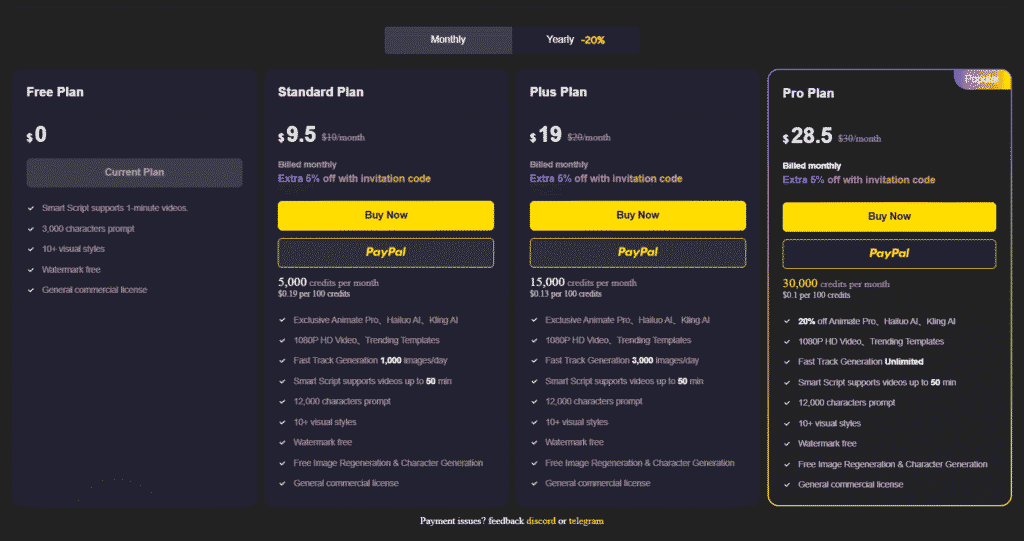
| Plan | Price/Month | Points | Max Video Length | Resolution |
|---|---|---|---|---|
| Free | $0 | 300 | 1 min | 720p |
| Standard | $9.50 | 5,000 | 30 min | 1080p |
| Plus | $19.00 | 15,000 | 30 min | 1080p |
| Pro | $28.50 | 30,000 | 30 min | 1080p/4K |
Each scene image = ~2 points
Each character = 5 points
Animation = varies (2–5 points)
Conclusion
In our Magic Light AI Review, we found the platform to be a powerful, beginner-friendly tool for automated storytelling video creation. It balances ease-of-use with impressive output quality. Whether you’re testing the waters with the free version or diving deep with a paid plan, Magic Light AI offers excellent value for digital storytellers.
From concept to final video, the process is intuitive, fast, and flexible. If you’ve been looking for an AI video tool that lets you focus on creativity, not complexity, Magic Light AI is a top-tier option.